
Redundant internet
Bond fiber, 5G and Starlink into one connection. Every packet travels over several links at once. Lose one and the stream doesn't even notice.
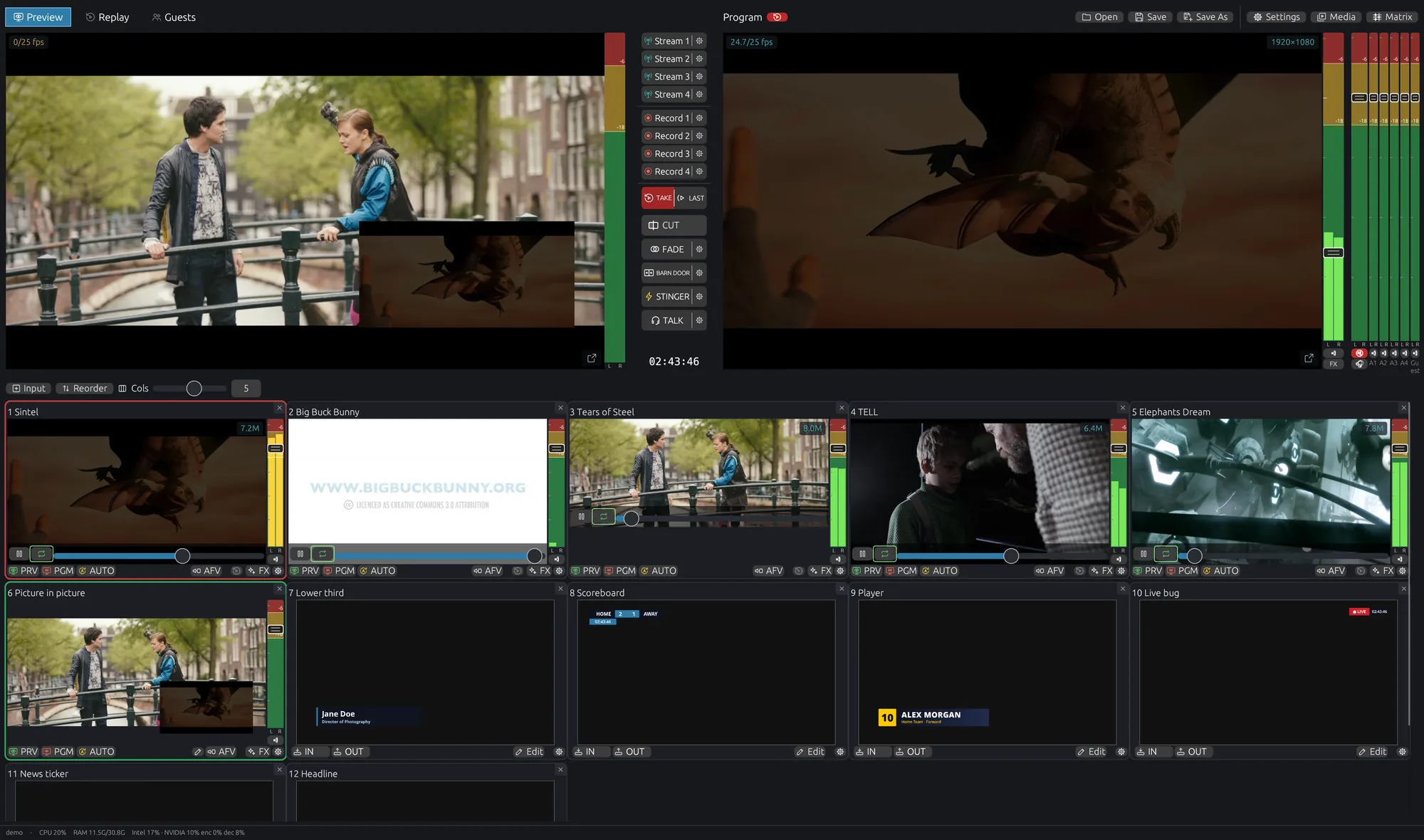
Mix cameras, remote guests, graphics and replays into a professional live show, stream it everywhere and record it, natively on your super stable Linux PC.
No Linux yet? Try our STREAMIX OS live by booting from a USB stick, without installing anything.
Get it now for FREE See SRT auto-discovery SWARMCAST
 YouTube


 Restream
+ any RTMP · SRT · WHIP
Restream
+ any RTMP · SRT · WHIP
 NDI®|HX

Bonded internet links, frame-synchronized SRT cameras, a built-in RTMP server and outputs that heal themselves. STREAMIX is built for the moments when things go wrong, so your show doesn't.
SRT is the most robust way to get video over any network, but until now it meant typing IP addresses, ports and latency values for every camera, and remote feeds never lined up. STREAMIX finds your cameras by itself, like NDI or OMT, and brings every feed in perfectly in sync.
Set your encoder or camera's SRT mode to listener. That's the only setting you touch.
STREAMIX scans your network and lists every SRT camera and encoder it finds, by name. No IPs, no ports, no URLs to type.
Each feed arrives frame-locked to the others, picture and sound. Cut between cameras like they're plugged into the same desk.
Basically every camera works with STREAMIX. If it speaks SRT, STREAMIX finds it and syncs it.
Your show shouldn't depend on Windows deciding it's time to restart. STREAMIX runs natively on Linux, the same system that keeps broadcast servers, CDNs and stock exchanges running.
Try it live, without installing. Boot from a USB stick, test everything on your own hardware, and keep your current system untouched.
STREAMIX OS is a super performant, rock-solid operating system with STREAMIX Studio built in. Plug in a USB stick, install, and the machine boots straight into production. Every setting is tuned for live video, show after show.
From a high-end production workstation to a small, modest PC: STREAMIX OS gets every last bit of performance out of the hardware, so your show runs smooth as butter on power machines and weak hardware alike.
Not sure yet? Start STREAMIX OS in live mode from a USB stick and test it on your own hardware first, without installing anything.
You need the STREAMIX OS download (ISO file, about 9 GB) and a USB stick with 16 GB or more. Everything on the stick is erased.
Windows: install Fedora Media Writer or Rufus, choose the ISO and your stick, write (in Rufus pick DD mode when asked).
Mac: install Fedora Media Writer or balenaEtcher, choose the ISO and your stick, write.
Linux: use Fedora Media Writer, or in a terminal: sudo dd if=STREAMIX-OS.iso of=/dev/sdX bs=4M status=progress oflag=sync (replace sdX with your stick).
Plug the stick into the PC and turn it on. Open the boot menu with F12, F11, F8 or Esc (depends on the PC) and pick the USB stick. STREAMIX OS starts in live mode right from the stick: test STREAMIX, your cameras, GPU and network on that exact machine without installing anything. The disk is not touched; remove the stick and the PC is as before.
Note: live mode keeps nothing. Restarting or shutting down wipes your recordings, shows and settings, so save anything you want to keep to another USB drive or network share before you restart. Live mode also keeps files in memory (RAM): for longer recordings, record straight to an external drive.
With an NVIDIA card, turn off Secure Boot in the BIOS first.
Click Install STREAMIX OS in the dock, choose the disk and confirm. The disk is erased completely. After a few minutes, remove the stick and restart: the machine boots straight into STREAMIX Studio.
Account: Streamix Studio, password streamix.
Every feature below exists because a real show once dropped. Now it doesn't.
Bond fiber, 5G and Starlink into one connection. Every packet travels over several links at once. Lose one and the stream doesn't even notice.
SRT cameras in listener mode are found automatically, like NDI®, and arrive frame-locked to each other: one switch on, and cuts between wireless or remote cameras stay in sync, audio included.
Phones, drones and encoders push straight into STREAMIX. Pick a port, get a public and local URL with an auto-generated key. No extra server.
Boot STREAMIX OS from a USB stick and run your real show on your own machine. Windows or whatever runs on it now stays exactly as it is. Pull the stick and it's like nothing happened. (Live mode keeps nothing: save recordings and shows elsewhere before you restart.)
Streams reconnect on their own. Recordings carry on in a new file after a disk error. Program flashes amber so you know, but nothing stops.
Frozen inputs show NO SIGNAL, stalled encoders restart, the machine can't fall asleep mid-show, and program video keeps rendering even if the interface hangs.
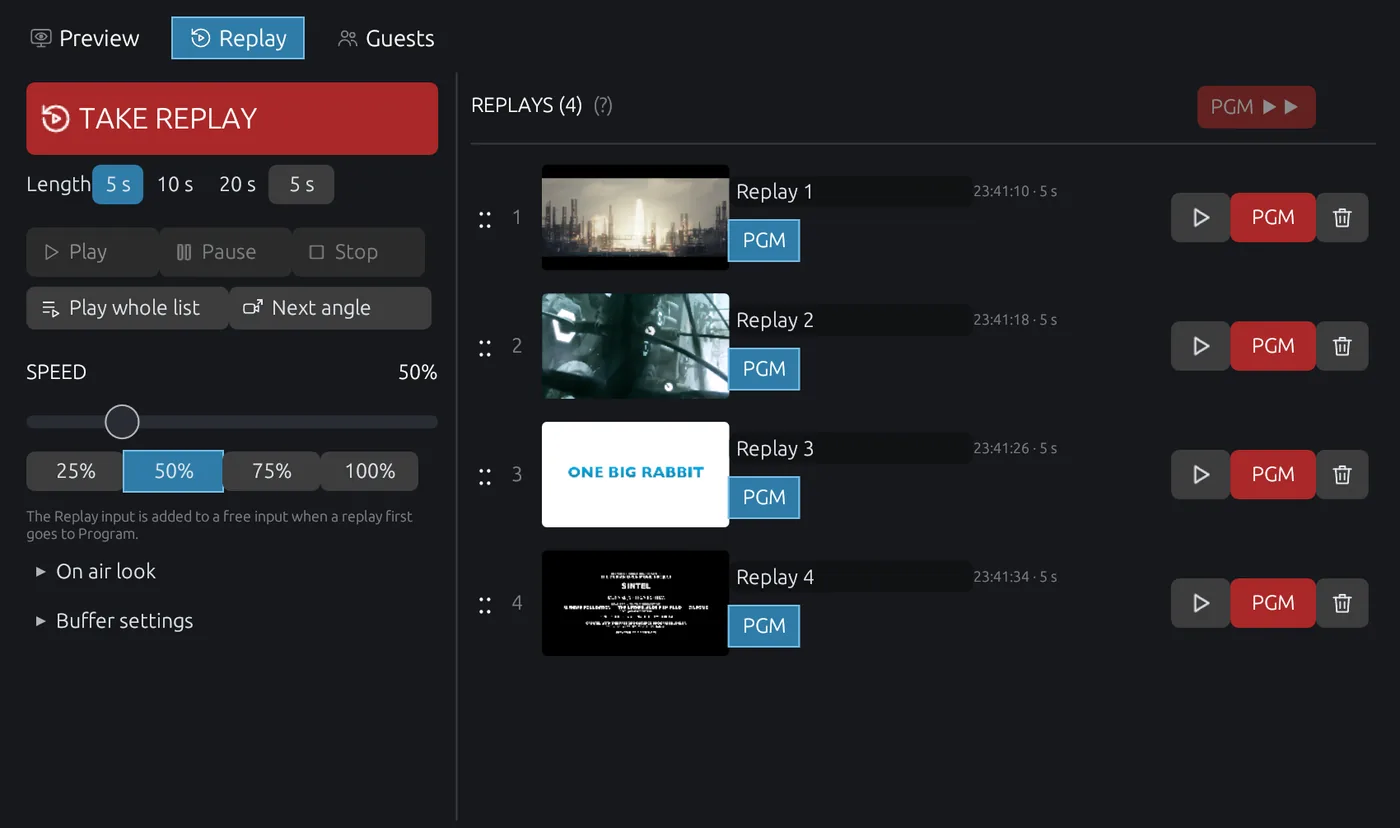
Arm any input, mark the moment, roll it back with your own stinger. Slow motion, playlists and a dedicated replay dashboard.
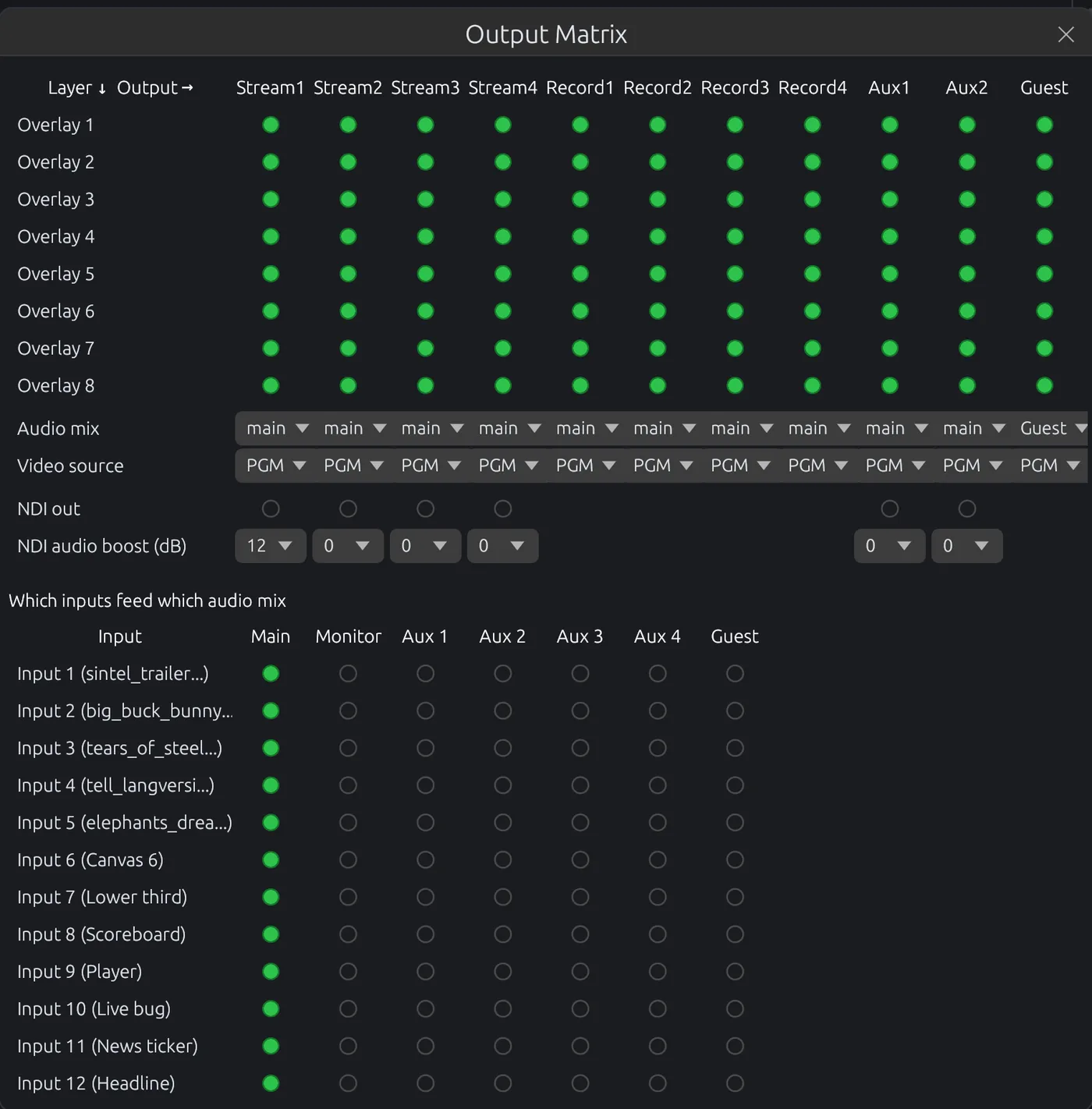
STREAMIX sends your stream over every link you have at the same time, through STREAMIX Cloud. The server keeps the first copy of each packet that arrives, so a dead link costs you nothing.
Cameras, capture cards, SRT, RTMP, WHIP, NDI® (in and out), remote guests (powered by VDO.Ninja), browser pages, files.
Program, preview and canvases rendered on the GPU at full frame rate.
Cut, fade, 9 wipe styles and custom stingers, one click each.
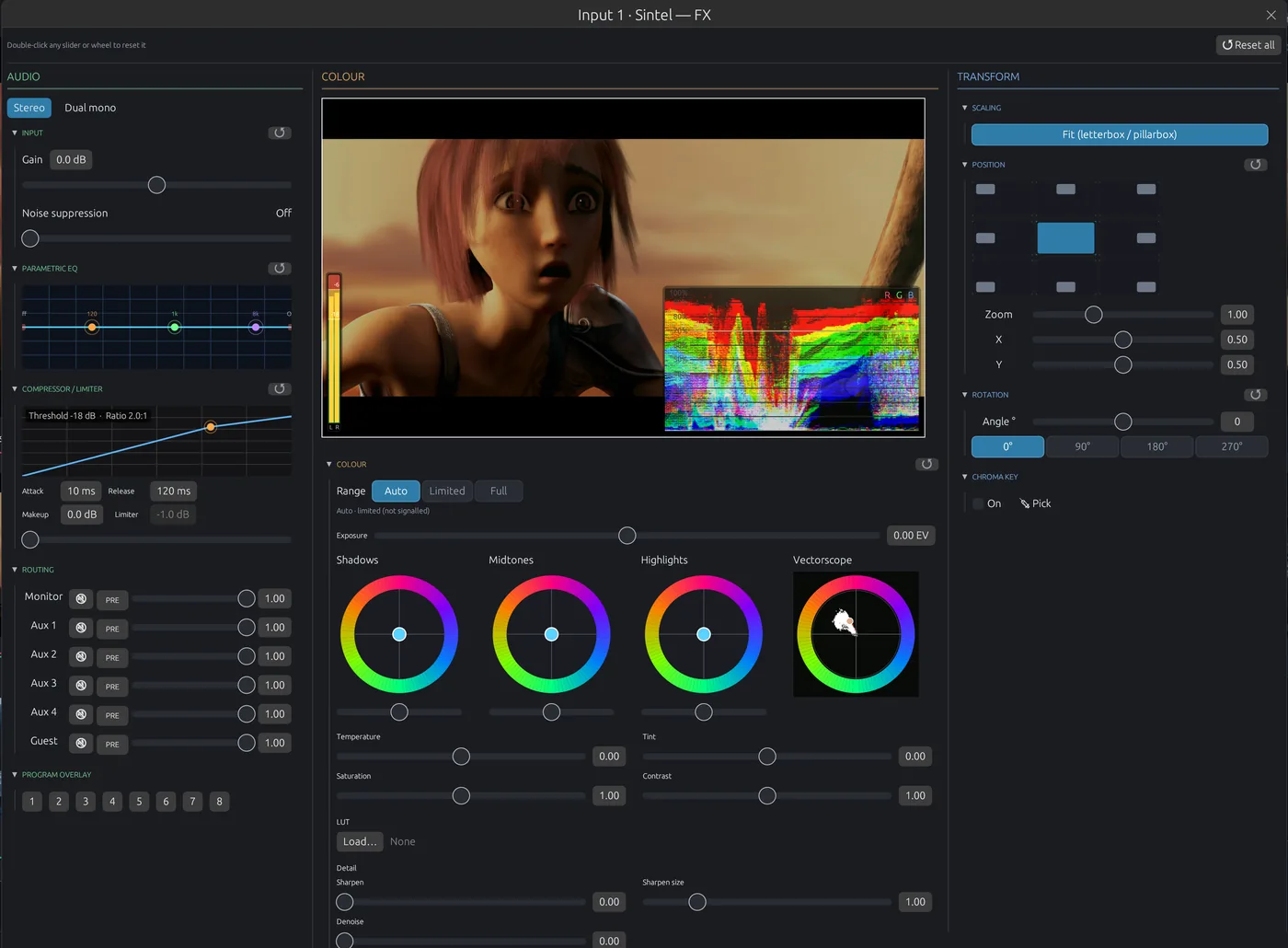
GPU keyer with spill removal and an eyedropper on the live picture.
Lower thirds, timers and scoreboards with IN / OUT animations.
dB faders with headroom, EQ, dynamics, noise suppression, AFV.
Multiple streams and recordings, VDO.Ninja streams, hardware encoding.
On-air and preview tally to every operator through TALLY-BACK.
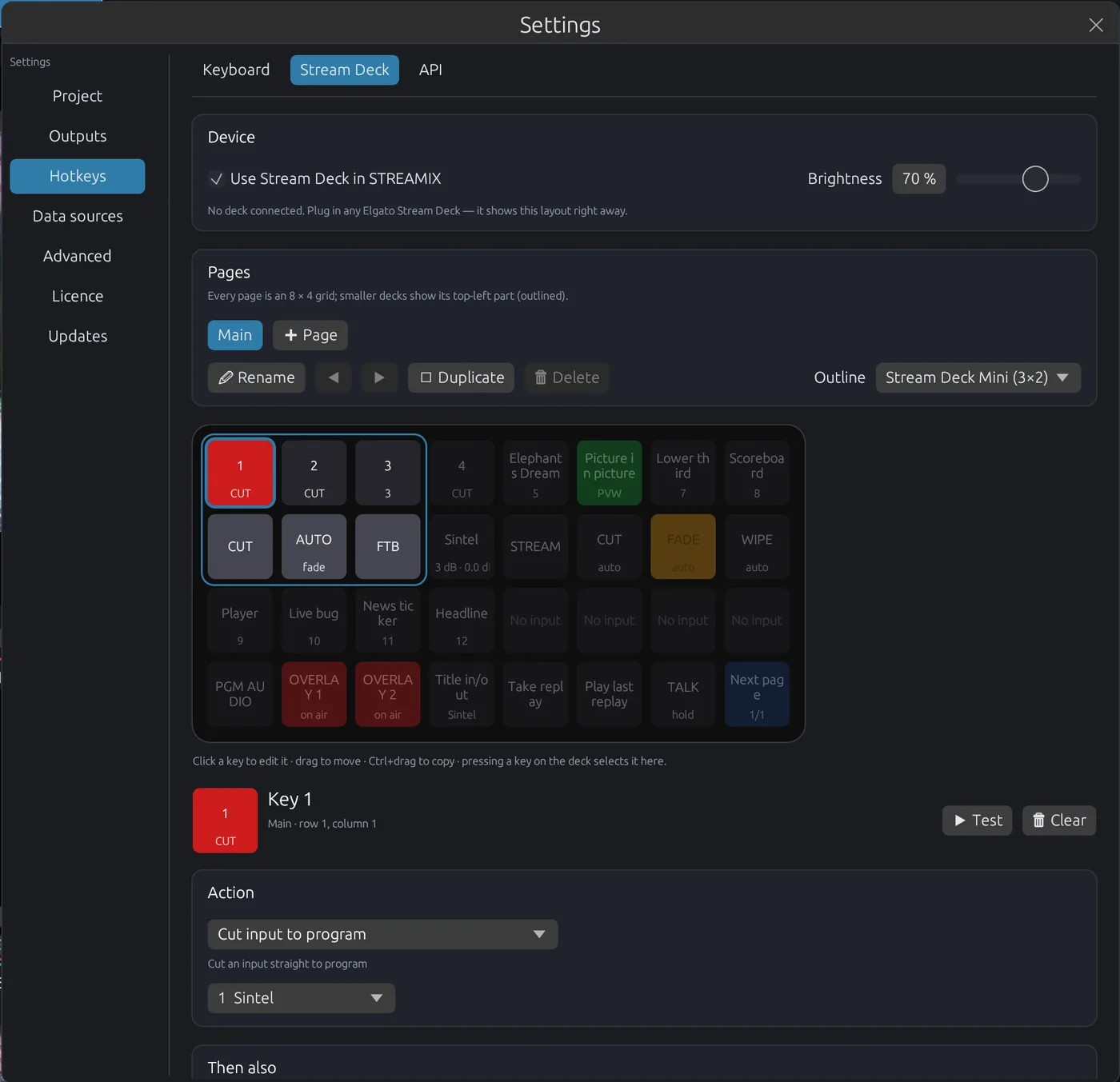

Design broadcast graphics right inside STREAMIX: text, shapes, images, gradients, tables, tickers and clocks, with In and Out animations and a preset gallery to start from. Titles render natively on program, no browser source and no extra software.
Point a title at any JSON or CSV feed: a results or sports API, a spreadsheet published to the web, or a local file. STREAMIX polls it every few seconds and fills fields, table rows and image URLs, so standings, scores and schedules stay current without anyone typing.
Rhai scripts sort and filter the rows, expressions on any property react to the data, and repeat groups build one block per row. Leader on top: when a rank changes, the row slides to its new place.
rows = sort_by_desc(rows, "score");
vars.leader = rows[0].name;Copy AI prompt hands an assistant your fields, data columns, layer names and helpers; paste the script it writes back in. Whole titles go in and out as JSON too, so an AI can draft a complete graphic for you to fine-tune.
curl -X POST -H 'Authorization: Bearer TOKEN' \
 http://127.0.0.1:8091/api/v1/actions/title.set_field \
 -d '{"input": 2, "field": "Home score", "value": "3"}'


Open STREAMIX on a tablet, a laptop or a second screen and it looks just like the Studio: live pictures of Preview, Program and every input, the transport column, bus faders, input meters and faders, media and title controls. Everyone on the team gets their own view, so the director cuts while the audio engineer mixes and the graphics operator plays titles, without getting in each other's way. Tabs for Replay (a multicam to recut replays live, roll to program), Audio (a full mixing desk) and Colour (wheels and scopes on the graded picture) give each crew member a desk of their own.
Listen plays the program mix in the browser. Intercom joins your talkback room from the same page: hear the crew and push to talk with your own microphone.
All pictures travel as one small video, encoded once on the Intel GPU and shared by every viewer: about 1.7 Mbit/s per browser, and NVENC stays free for your streams.
In the studio network it works out of the box. With STREAMIX Online the same page runs over https from anywhere, with no port forwarding and no VPN.
You get STREAMIX Unlimited plus three online services that complete your show: a CDN to deliver your stream, talkback for your crew and internet bonding. Remote control is included too: run the whole desk from a browser anywhere, without port forwarding. Sign in once inside STREAMIX and everything is set up for you: your CDN channels, your talkback rooms and your bonded internet links show up in the app, ready to use.
A content delivery network for your live streams: reach as many viewers as you want, with your own player on your own website, embed code and live chat. No ads, no platform rules, unlimited traffic.
A full intercom for your crew that runs on their phones. Push-to-talk with the director, and the screen lights up red on air and green on preview. Operators just open a link, no app or hardware needed.
Combine fiber, 5G and Starlink into one connection that can't drop. Every packet travels over several links at once, so losing a link costs you nothing. Link status is shown live in STREAMIX.
Buy STREAMIX once and keep it, or subscribe to Online and get the app together with the full online toolset.
For trying out and small shows
Free forever, no account needed.
For professional productions
Perpetual licence with 2 years of updates. Renew updates for €249.
The complete production chain
Or €500 per year (2 months free). Cancel anytime.
Prices excl. VAT. Unlimited: after the update period your licence keeps working with every version released in it. Online: STREAMIX Unlimited runs while the subscription is active.
An AppImage for 64-bit Linux (x86_64). Runs as the Free edition without an account; sign in inside STREAMIX to unlock your licence. Updates download in the background and never interrupt a live show.
Install with one command, including a launcher in your applications menu:
curl -fsSL https://streamix.studio/install.sh | bashNo root needed. To remove it again: curl -fsSL https://streamix.studio/install.sh | bash -s -- --uninstall
Or download the AppImage Download STREAMIX OS (ISO, 9 GB)
STREAMIX OS: try it live from a USB stick or install it on a PC. See how to install.
Then make it executable and start it:chmod +x STREAMIX_Studio-*.AppImage && ./STREAMIX_Studio-*.AppImage
64-bit (x86_64) desktop Linux with glibc 2.35 or newer: Ubuntu 22.04+, Debian 12+, Fedora 39+, Linux Mint 21+, Pop!_OS 22.04+, and current Arch, Manjaro and openSUSE Tumbleweed.
Recommended: Ubuntu 24.04 LTS or the current Fedora Workstation.
NVIDIA with NVENC and the proprietary driver, or Intel / AMD with Mesa VA-API drivers. Without a supported GPU, STREAMIX encodes on the CPU.
Minimum: 4-core CPU, 8 GB RAM.
Recommended: 8 cores, 16 GB RAM or more for instant replay and many inputs, an SSD for recordings, and wired network for SRT cameras.
If STREAMIX does not start, install FUSE: sudo apt install fuse3 (Fedora: sudo dnf install fuse3). More in the install guide.
Volunteer-friendly multi-camera services, lyrics and titles, streamed every week without surprises.
Wireless SRT cameras in sync, instant replay, scoreboards, bonded uplink from any field.
Linux hardware, offline licence, redundant internet. Built for the road.
Conferences and hybrid events with remote guests and no per-event cloud fees.
Program and preview workflow, chroma key, scopes, professional audio.
Repeatable setups on standard PCs. No dongles, no expiring rental software.
Start with the free edition today and upgrade when your show grows.